IAMOps Philosophy
IAMbic provides a GitOps approach to IAM management (IAMOps). Check out our Example IAMbic Templates repository to see how IAMbic works in practice. The example resource creation and deletion flows in this documentation provide a more detailed look at how IAMbic works. And when you're ready to move to a GitOps approach to IAM management, check out our guide for deploying to GitHub
GitOps, IAMOps, and IAMbic
GitOps is a modern approach to managing and maintaining software infrastructure through version-controlled code repositories like Git. It combines development best practices, such as version control and automated testing, with operations tasks like deployment and monitoring. In a nutshell, GitOps makes it easy for developers and operations teams to collaborate and maintain infrastructure by treating it as code.
IAMOps, or Identity and Access Management Operations, takes the GitOps concept and applies it to managing cloud identities and permissions. It focuses on centralizing and streamlining the tracking and management of cloud identities, access rules and user permissions using Git as the source of truth. This way, developers, operations, security, and compliance teams can work together more efficiently, applying the same best practices they use for code development to manage access and permissions across different cloud platforms.
IAMbic uses Git to keep track of changes in your cloud permissions and configurations. By using Git's branching and commit history, IAMbic can easily spot differences in your cloud settings without having to make time-consuming requests to your cloud provider.
Iambic Import Process
The IAMbic import process grabs updates from your cloud environment and puts them into your Git repository as IAMbic templates. IAMbic comes with AWS EventBridge Rules that run on a schedule to automatically import changes from your cloud environment. If you want, you can also run the import process manually. This commit serves as an example of a real-life import process of existing AWS resources into Git by IAMbic.

What are IAMbic template files?
IAMbic uses Git as a database to store cloud permissions. These cloud permissions are represented as IAMbic template files.
IAMbic template files are human-readable files used to represent and manage your cloud identities, principals, and permissions within IAMbic. These files are stored in a Git repository, allowing you to track changes, collaborate, and apply version control to your cloud permissions management.
The templates enable you to import, organize, and group your existing cloud resources in a structured manner, which simplifies managing permissions across multiple cloud environments and accounts. IAMbic template files support declarative definitions of temporary principals, permissions, and access rules, making it easier to implement features like zero-standing-permissions and breakglass access.
Guide to the IAMbic Apply Process
The "Apply Process" is the pivotal stage of IAMbic's operational flow.
This is when your modifications to IAMbic templates are translated into actual changes in your cloud environment.
Once your adjustments are approved via Git, you can initiate the apply process with a simple command (iambic apply) in your pull request.
At this stage, IAMbic identifies the necessary updates to align your cloud with the new desired state, and it proceeds to implement these changes.
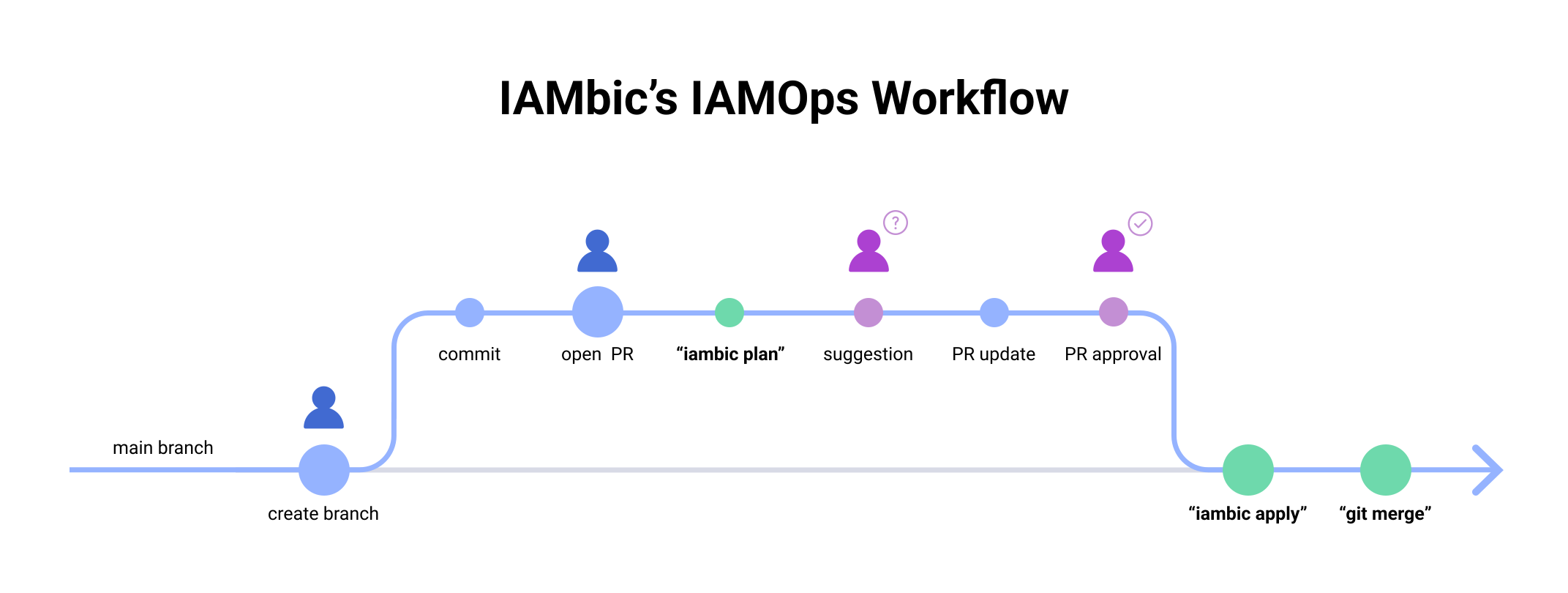
For a complete demonstration of IAMbic's operational flow, refer to this pull request. This example features a request for creating an Identity Center Permission set. Here's how the process unfolds:
Step 1: Create a commit and an initial pull request
The initial commit represents your request for changes. In our example, it comprises a request for temporary access for the engineering group, set to expire after 4 years. The second policy statement from our list of inline policies has an expiration set for 6 years (for demonstration purposes), and our managed policy attachment expires after 5 years.

Step 2: Receive IAMbic's Plan Output
Upon receiving your commit, IAMbic will respond with a plan detailing the proposed changes.

Step 3: Peer Approval
Ensure your request is approved by a peer who has write access to the repository. .
Step 4: Initiate the Apply Process
Instead of merging the PR immediately, issue the iambic apply command in your PR. This command instructs
IAMbic to execute the changes in the cloud, update the PR with a commit reflecting these changes, and finally,
merge the change into the main branch once successful.
Step 5: Verify the Changes
IAMbic will apply the changes successfully and convert the relative expiration dates from step 1 into absolute expiration dates. You can see this action in this commit.

Step 6: Confirm the Result of the iambic apply Command
IAMbic will provide a comment on the PR summarizing the result of the iambic apply command.
This serves as a concise report of the actions taken.
Step 7: Complete the Apply Process
Finally, IAMbic will merge the branch into the repository's default branch, marking the completion of the operational flow.

Guide to the IAMbic Resource Deletion Process
IAMbic requires specific instructions if you would like to delete resources associated with IAMbic templates. This is to prevent accidental deletion of resources. The process is carried out through a sequence of operations in Github, beginning with a pull request, and ending with a successful deletion and merge.
Here is an example IAMOps flow for deleting resources: PR Example
Step 1: Specify deleted: true in your template
Add deleted: true to the top level of the IAMbic template you would like to remove.
In the first commit on this PR branch, we see deleted: true added to the template.

Step 2: IAMbic Comments with a Plan
IAMbic proccesses and comments on the PR with a proposed plan of action.

Step 3: Approval from a Peer
A peer with write access to the template needs to approve the PR.
Step 4: Apply the Change
After the approval, we instruct IAMbic to execute the change in the cloud environment.
This can be done by commenting iambic apply on the PR.

Step 5: Deletion Process
IAMbic carries out the following steps during the iambic apply process:
- Successfully deletes the group in Google Workspace.
- Pushes a commit that removes the template in git.
- Provides a comment detailing the actions taken in the PR.
- Merges the branch into the main branch, which closes the PR.
- Deletes the branch.
